July 12, 2026
Business Automation ROI Explained for Decision-Makers
Unlock the potential of your investments with business automation ROI explained. Discover the true value of automation beyond labor savings.

Business Automation ROI Explained for Decision-Makers
TL;DR:
- Business automation ROI includes time savings, revenue gains, cost displacement, error reduction, and capacity increases. Accurate measurement requires tracking real savings, budgeting for hidden costs, and conducting multiple scenario analyses. Success depends on fixing flawed processes first and monitoring performance after deployment.
Business automation ROI is defined as the measurable financial return an organization earns by replacing manual processes with automated systems, calculated across time saved, cost reduced, revenue gained, and risk avoided. Most business leaders underestimate this return because they count only labor savings and ignore four other value drivers. Well-scoped automation projects typically pay back in 4–12 months, with first-year ROI frequently ranging from 150% to 400%. Understanding the full picture is what separates a credible investment case from a guess.
What are the key components that drive business automation ROI?
The biggest mistake in automation ROI is counting only labor savings. True ROI spans five pillars: time reclaimed, revenue uplift, cost displacement, error reduction, and capacity multiplication. Each one adds measurable value that labor savings alone cannot capture.
Here is what each pillar means in practice:
- Time reclaimed. Automation removes repetitive manual tasks from your team’s plate. A billing team that spends 15 hours a week on invoice matching can redirect that time to collections, analysis, or customer service.
- Revenue uplift. Faster sales cycles and better lead follow-up convert more opportunities. Automated CRM workflows, for example, cut response times from days to minutes, which directly lifts close rates.
- Cost displacement. Automation often consolidates or eliminates tools, subscriptions, and third-party services. One integrated workflow can replace two or three separate software licenses.
- Error reduction. Manual data entry errors trigger rework, refunds, and compliance penalties. Automation removes the human error point and reduces those downstream costs.
- Capacity multiplication. Your team can handle higher volume without adding headcount. This is the ROI driver that scales the fastest as your business grows.
Swipecredit’s revenue operations automation platform is built around all five of these pillars, not just labor savings. That design choice matters when you are building a business case for leadership.
How do you calculate and interpret automation ROI?
Calculating automation ROI follows a straightforward formula, but the inputs require care.
The basic formula:
ROI (%) = [(Total Benefits – Total Costs) ÷ Total Costs] × 100
Payback period:
Payback Period (months) = Total Investment ÷ Monthly Net Benefit
The formula is simple. Getting the inputs right is where most calculations go wrong.
Step 1: Use opportunity cost labor rates
Do not use nominal salary rates. Use the opportunity cost of time, which is the value of what your team could produce if freed from the manual task. For a $75,000-per-year analyst, the loaded hourly rate including benefits and overhead is typically $55–$70 per hour. That is the number to use.

Step 2: Measure time savings empirically
Estimates inflate ROI projections. Time tasks with a stopwatch before and after deployment. Real-world savings are often 20–40% lower than estimates because of hidden process steps and exception handling. Use measured data, not assumptions.
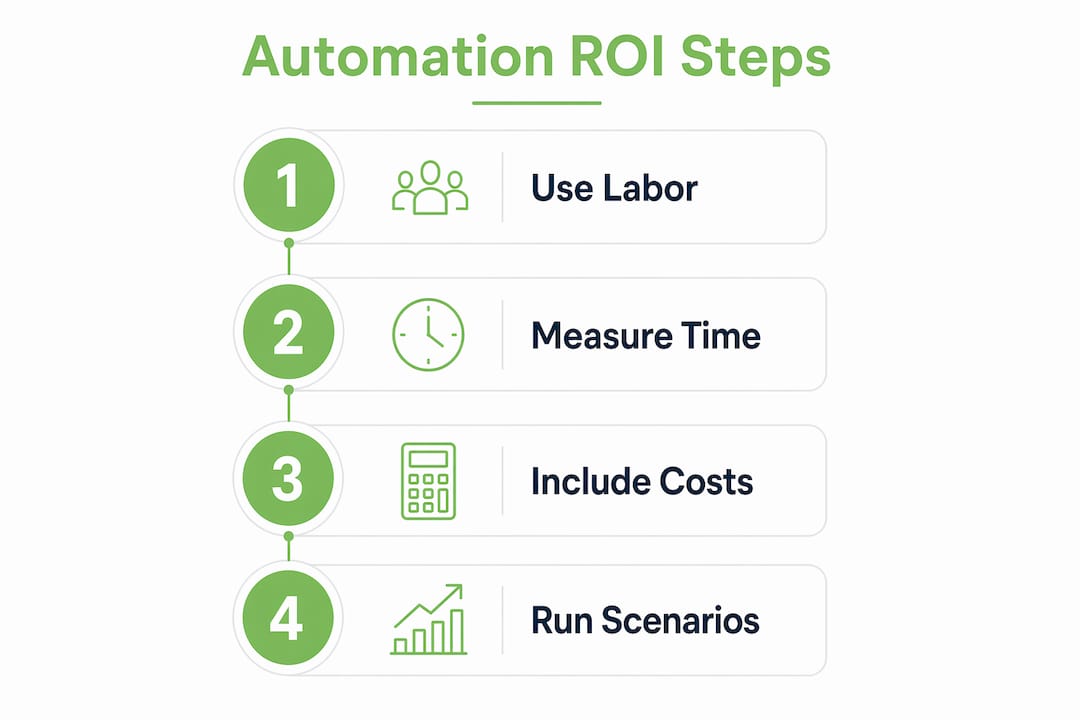
Step 3: Include all costs
| Cost Category | Examples |
|---|---|
| Build cost | Development, configuration, integration |
| Training and onboarding | Staff time, external trainers, documentation |
| Maintenance (annual) | Bug fixes, updates, monitoring |
| Change management | Process redesign, communication, adoption support |
Simple single-step workflows cost $15,000–$35,000 to build. Multi-system orchestrations run $80,000–$250,000. Annual maintenance typically equals 18% of the initial build cost. Budget for all of it.
Step 4: Run three scenarios
Scenario-based sensitivity analysis is what separates a credible business case from an optimistic slide deck. Build three versions: expected, conservative, and upside. Show leadership how ROI shifts if adoption takes six months instead of three, or if maintenance runs 25% over budget.
Pro Tip: Track actual hours saved weekly for the first 90 days post-launch. Compare that data against your pre-launch estimates. The gap tells you exactly how accurate your model was and where to adjust future projections.
What hidden costs and risks affect real-world automation ROI?
Hidden costs are the most common reason automation projects disappoint. Training, setup, support, and change management can double or triple the total initial investment. Teams that skip budgeting for these costs routinely miss their ROI targets.
The specific risks to watch:
- Adoption ramp-up. Full user proficiency after a new automation deployment typically takes 3–6 months. During that window, productivity gains are partial, not full. Your ROI model must reflect this delay.
- The silent-failure tax. When an automation breaks without detection, the operational damage can exceed what the manual process would have caused. Monitoring and alerting are not optional. They are part of the system design.
- Nonlinear complexity costs. A five-step workflow can cost significantly more than five times as much to maintain as a single-step workflow. Complexity scales disproportionately, and most early-stage ROI models underestimate this effect.
- Ongoing human oversight. Automation reduces manual work. It does not eliminate the need for human judgment. Someone must monitor outputs, catch exceptions, and approve edge cases. Budget for that role.
Pro Tip: Before signing off on any automation project, add a 20% contingency to your total cost estimate. In most real-world deployments, that buffer gets used.
For a practical look at where hidden costs hit SMBs hardest, the operational efficiency checklist from Swipecredit is a useful reference. It maps common process gaps to their actual cost impact.
Understanding why CEOs invest in business automation also helps frame the conversation internally. Most executives approve automation budgets when they see a conservative ROI case with realistic assumptions, not an optimistic one with inflated projections.
How can leaders maximize automation ROI across their organizations?
Maximizing the return on automation investments requires a disciplined selection and sequencing process. Not every automation is worth building. The ones that are worth building need to be tracked rigorously after launch.
- Prioritize high-impact processes first. Focus on automations that save more than 10 hours of labor per week or carry significant error costs. ROI is marginal below that threshold unless risk reduction is a major factor.
- Rank initiatives by ROI ratio. Calculate expected ROI for each candidate project and rank them. Fund the top three before expanding. This prevents spreading resources across too many low-return automations simultaneously.
- Audit at 4 weeks and 12 months. Baseline your metrics before launch. Audit actual performance at the 4-week mark to catch early problems, then again at 12 months to detect degradation. Post-launch auditing is the only way to verify that projected ROI is actually being realized.
- Involve cross-functional teams early. Operations, finance, IT, and the end users of the process all need a seat at the table before build begins. Late-stage surprises from any of these groups are expensive.
- Position AI as a workforce multiplier. The most durable automation ROI comes from augmenting your team’s capacity, not replacing people. Employees who trust the automation and understand its purpose adopt it faster and maintain it better.
The Swipecredit ROI calculator gives business leaders a structured way to model these scenarios before committing budget. It accounts for all five ROI pillars and lets you run conservative, expected, and upside cases side by side.
Key Takeaways
Business automation ROI is only credible when it accounts for all five value pillars, uses measured time savings, and includes the full cost of maintenance, training, and change management.
| Point | Details |
|---|---|
| Count all five ROI pillars | Include time saved, revenue uplift, cost displacement, error reduction, and capacity gains. |
| Use opportunity cost rates | Apply loaded labor rates, not nominal salaries, for accurate time-savings valuation. |
| Budget for hidden costs | Training, maintenance, and change management can double your initial investment estimate. |
| Run three ROI scenarios | Model conservative, expected, and upside cases to build a credible business case. |
| Audit post-launch | Measure actual savings at 4 weeks and 12 months to verify and sustain projected returns. |
The number that changes everything
I have reviewed a lot of automation business cases over the years, and the pattern is almost always the same. The projected ROI looks great. The actual ROI, measured 12 months later, is lower. Sometimes significantly lower. The gap is almost never caused by a bad technology choice. It is caused by underestimating adoption time, skipping maintenance budgets, and using estimated time savings instead of measured ones.
The number that changes everything is the one you measure after launch, not the one you project before it. I have seen teams build genuinely strong automation programs by starting with one well-chosen process, measuring it obsessively, and using that data to justify the next investment. That approach builds organizational trust in automation faster than any slide deck.
The conservative scenario in your sensitivity analysis is not the pessimistic one. It is the honest one. Present it first. If the ROI still looks good under conservative assumptions, you have a real business case. If it only looks good under the upside scenario, you have a hope.
One more thing: do not automate a broken process. Automation amplifies whatever is already happening. A flawed manual workflow becomes a fast, flawed automated one. Fix the process first, then automate it.
— Kevin
How Swipecredit helps you measure and grow automation ROI
Swipe Credit AI helps teams reveal valuable business opportunities, act with greater clarity, and measure outcomes while keeping people in control.
FAQ
What is business automation ROI?
Business automation ROI is the financial return an organization earns by automating manual processes, measured across time saved, costs reduced, revenue gained, and errors avoided. It is calculated using the formula: (Total Benefits – Total Costs) ÷ Total Costs × 100.
How long does it take to see a return on automation investment?
Simple single-step automations typically pay back in 2–3 months. Complex multi-system projects take 9–15 months, with first-year ROI commonly ranging from 150% to 400%.
What are the most common hidden costs in automation projects?
Training, change management, ongoing maintenance, and adoption ramp-up are the most frequently underestimated costs. These expenses can double or triple the initial investment and delay full ROI by 3–6 months.
Is automation ROI worth it for small businesses?
Automation ROI is worth it for small businesses when the target process saves more than 10 hours of labor per week or carries significant error costs. Below that threshold, returns are often marginal unless risk reduction is a primary goal.
How do you measure automation ROI after launch?
Track actual hours saved weekly for the first 90 days, then audit performance at the 4-week and 12-month marks. Real-world savings are often 20–40% lower than pre-launch estimates, so ongoing measurement is the only reliable way to verify and sustain returns.