July 15, 2026
How AI Improves Business Reporting in 2026
Discover how AI improves business reporting by automating tasks, increasing accuracy, and helping decision-makers act faster in 2026.

How AI Improves Business Reporting in 2026
TL;DR:
- AI automates routine data tasks, improves data accuracy, and enables faster decision-making through narrative insights. It replaces manual reporting work, allowing analysts to focus on analysis and strategy instead of data formatting. Autonomous AI agents monitor sources continuously, generate reports, and alert teams proactively, enhancing data trust and operational efficiency.
AI improves business reporting by automating routine data tasks, raising data accuracy, and generating narrative insights that help decision-makers act faster. The industry term for this shift is AI-augmented reporting, and it is rapidly replacing the old model where analysts spent most of their week pulling numbers and formatting slides. Roughly 80% of business reporting work is mechanical in nature. That means four out of every five hours your team spends on reports could be redirected to actual analysis. For business analysts and decision-makers at SMBs, MBEs, and growing enterprises, that shift is not a future promise. It is available right now.
How AI improves business reporting by cutting manual work
The mechanical layer of reporting is the biggest drain on analyst time. Data extraction from ERP systems, CRM platforms, spreadsheet exports, and third-party APIs takes hours every cycle. AI automates all of it by connecting directly to those sources, pulling structured data on a schedule or trigger, and formatting outputs consistently without human input.

Narrative generation is where the time savings become most visible. Financial teams save 60–90 minutes per reporting cycle when AI drafts variance explanations automatically. That is not a small efficiency gain. Over a quarter, those minutes add up to days of recovered analyst capacity.
The practical result is a shift in the analyst’s role. Instead of writing “Revenue declined 8% versus prior month due to lower transaction volume in the Southeast region,” the analyst reviews that sentence, confirms it is accurate, and adds the strategic context AI cannot provide. AI writes. Analysts edit and interpret. That division of labor is where the real productivity gain lives.
- Data extraction: AI connects to ERP, CRM, and API sources and pulls structured data automatically on a set schedule.
- Variance calculation: AI computes period-over-period changes and flags deviations without manual formula work.
- Narrative drafting: AI generates plain-language explanations of metric changes, ready for analyst review.
- Formatting and layout: AI applies consistent report templates, removing the copy-paste work that consumes hours each cycle.
- Distribution: AI routes completed reports to the right stakeholders automatically, based on predefined rules.
Pro Tip: Start AI automation with your most repetitive report first. A weekly sales summary or monthly cash flow report is the ideal test case. Once that workflow runs reliably, expand to more complex outputs.
How AI improves enterprise data quality for reliable reporting
Bad data is the single biggest reason AI reporting projects fail. Poor data quality causes 60% of AI project failures, according to Gartner research. That number should stop every decision-maker in their tracks before they invest in any AI reporting tool.
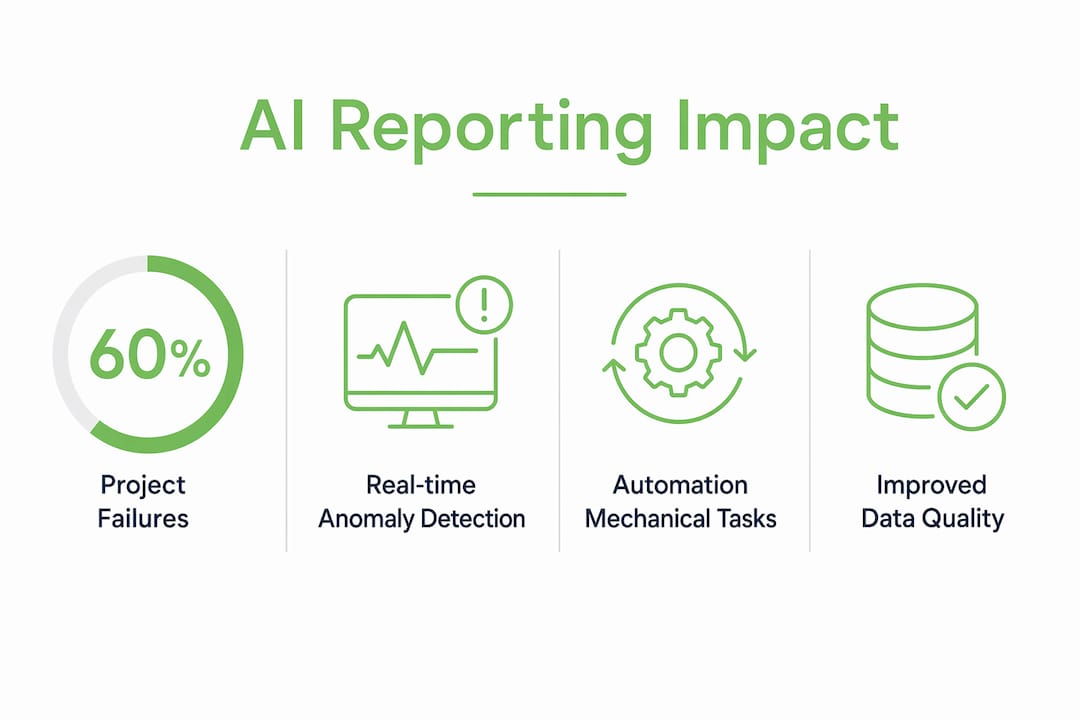
The traditional approach treats data quality as a downstream fix. Analysts catch errors after the fact, correct them manually, and hope the next cycle is cleaner. AI flips that model. Machine learning methods embed cleansing, validation, and anomaly detection directly into the data pipeline, before the report is ever generated.
The performance gains from this approach are significant. AI-based data quality methods reduce configuration and deployment time by up to 90%, improve accuracy by 60%, and correct errors at rates up to 95%. Those are not marginal improvements. They represent a structural change in how trustworthy your reporting inputs are.
Real-time anomaly detection is one of the most practical benefits. When a data feed sends an outlier value, such as a transaction amount that is 10 times the normal range, AI flags it immediately rather than letting it corrupt the final report. That prevention is far cheaper than discovering the error after an executive has already acted on flawed numbers.
| Data quality challenge | Traditional approach | AI-driven approach |
|---|---|---|
| Duplicate records | Manual deduplication after the fact | Automated entity resolution in the pipeline |
| Missing values | Analyst fills gaps or excludes rows | AI imputes or flags missing data before reporting |
| Outlier detection | Spotted during review, if at all | Real-time anomaly detection with automatic alerts |
| Format inconsistencies | Manual normalization per cycle | Standardization rules applied at ingestion |
| Validation errors | Caught downstream, corrected manually | Upstream validation prevents errors from entering |
Embedding AI-driven quality assurance into your data pipeline shifts data quality from a cost center to a strategic asset. Clean data means faster reporting cycles, fewer corrections, and reports that executives actually trust.
What is the difference between AI agents and chatbots in reporting?
Most people use the terms “AI agent” and “chatbot” interchangeably. They are not the same thing, and the distinction matters enormously for business reporting.
A chatbot waits for a user to ask a question. It responds to prompts and stops working the moment the conversation ends. An AI agent operates autonomously. It monitors data sources on a continuous schedule, detects anomalies, generates reports, and escalates exceptions to the right person, all without anyone asking it to do so.
AI agents autonomously handle reporting by monitoring multiple data sources simultaneously and acting on triggers rather than user commands. That structural difference changes what is possible. An AI agent can detect a cash flow anomaly at 2:00 AM, generate a summary report, and send an alert to the CFO before the business day starts. A chatbot cannot do any of that without a human initiating the interaction.
The business case for AI agents in reporting is backed by real results. Enterprises that deployed autonomous AI agents for reporting saw cycle times drop by 87%, error rates fall by 94%, and operational costs decrease by 62%. Reporting frequency increased by 600%, with real-time insights replacing weekly or monthly batch cycles.
Pro Tip: Before deploying AI agents, conduct a data audit of every source the agent will connect to. Automating a broken process only replicates the errors faster. Fix the data pipeline first, then automate.
The key advantage of AI agents over passive tools is their ability to adapt. When a data source goes offline or a metric exceeds a threshold, the agent adjusts its workflow, logs the exception, and notifies a human reviewer. That kind of proactive behavior is what separates AI-powered reporting automation from basic dashboard tools.
Best practices for combining AI reports with human review
AI-generated reports require a mandatory human review gate. Skipping human review exposes your organization to reputational and regulatory risk. AI is excellent at describing what happened. It is not equipped to explain what it means for your business strategy, your customers, or your competitive position.
The most effective workflow keeps AI focused on descriptive reporting and reserves strategic recommendations for human analysts. AI writes the variance explanation. The analyst writes the recommendation. That boundary protects the credibility of every report that leaves your team.
Pre-calculation layers are a critical technical safeguard. Using SQL or Python to pre-aggregate metrics before feeding data to an AI model prevents math errors and hallucinated figures. AI should receive clean, pre-calculated numbers, not raw transaction data it must compute on its own. The math layer belongs in your data pipeline, not in the AI prompt.
A structured review workflow looks like this:
- Run the pre-calculation layer. SQL or Python scripts aggregate raw data into clean, validated metrics before AI touches them.
- Generate the AI narrative. The AI model receives structured inputs and drafts variance explanations and executive summaries.
- Analyst review. A human reviewer checks every figure against the source data and confirms the narrative is accurate.
- Add strategic context. The analyst appends recommendations, risks, and forward-looking commentary that AI cannot reliably provide.
- Consistency check. Compare the report structure against prior periods to confirm comparability before distribution.
Pro Tip: Build a validation checklist your analysts complete before approving any AI-generated report. Include checks for data source freshness, formula accuracy, and narrative alignment with known business events. A five-minute checklist prevents costly corrections later.
Consistency in report structure is underrated. When every report follows the same format, period over period, readers can spot changes faster and trust the output more. AI enforces that consistency automatically. Humans rarely do.
Key Takeaways
AI-augmented reporting delivers the most value when clean data, autonomous agents, and structured human review work together as a system.
| Point | Details |
|---|---|
| Automate the mechanical layer | AI handles data extraction, variance calculation, and narrative drafting, freeing analysts for strategic work. |
| Fix data quality upstream | Embed AI cleansing and validation in the pipeline before reports are generated, not after errors appear. |
| Choose agents over chatbots | Autonomous AI agents monitor sources continuously and act without prompts, delivering real-time reporting. |
| Keep humans in the loop | Mandatory analyst review of every AI-generated report protects accuracy and strategic credibility. |
| Pre-calculate before you generate | Feed AI clean, aggregated metrics using SQL or Python to prevent math errors and hallucinated figures. |
What I have learned from watching teams adopt AI reporting
The organizations that get the most out of AI reporting are not the ones with the biggest budgets. They are the ones that started small, fixed their data first, and treated AI as a productivity tool for mechanical tasks rather than a replacement for analyst judgment.
I have seen teams rush to automate complex financial models before their data pipelines were clean. The result was faster production of wrong answers. The AI did exactly what it was asked to do. The problem was the inputs. Every time, the fix was the same: go back, audit the data sources, build the pre-calculation layer, and then automate.
The shift that actually changes a business is when analysts stop spending their week writing reports and start spending it asking better questions. That is the real benefit of AI in business reporting. It is not the report itself. It is the time and mental space the analyst gets back to think clearly about what the numbers mean.
One more thing worth saying plainly: AI tools in this space are evolving fast. The workflow you design today may need to change in 12 months. Build flexibility into your process. Do not hard-code assumptions about what your AI tool can or cannot do. Test, review, and adjust as the tools improve. The teams that stay curious and keep iterating will pull ahead of the ones that set it and forget it.
— Kevin
Swipecredit makes AI reporting work for your business
Swipe Credit AI helps teams reveal valuable business opportunities, act with greater clarity, and measure outcomes while keeping people in control.
Swipe Credit AI helps teams reveal valuable business opportunities, act with greater clarity, and measure outcomes while keeping people in control.
FAQ
How does AI automate business reporting?
AI automates business reporting by connecting to data sources like ERP and CRM systems, extracting structured data on a schedule, calculating variances, and drafting narrative explanations automatically. Roughly 80% of reporting work is mechanical and well-suited to this kind of automation.
What is the biggest risk of using AI for business reports?
The biggest risk is poor data quality entering the AI pipeline. Poor data quality causes 60% of AI project failures, so embedding automated cleansing and validation upstream is the most important safeguard before deploying any AI reporting tool.
Should AI replace human analysts in reporting?
AI should not replace human analysts. AI handles descriptive reporting and mechanical tasks, while human analysts provide strategic recommendations, contextual judgment, and the final review gate that protects report accuracy and credibility.
What is an AI agent and how is it different from a chatbot?
An AI agent operates autonomously, monitoring data sources and generating reports on a schedule or trigger without user prompts. A chatbot only responds when a human initiates a conversation, making it far less useful for continuous, real-time reporting workflows.
How do I prevent math errors in AI-generated reports?
Use a pre-calculation layer, built with SQL or Python, to aggregate and validate metrics before passing them to the AI model. Feeding AI clean, pre-aggregated numbers prevents the model from computing raw data incorrectly and eliminates the most common source of hallucinated figures in AI reports.