August 1, 2026
Best SOX Compliance Software for SMBs: AI-Driven Guide
Discover the best SOX compliance software for SMBs. Automate testing, monitor continuously, and streamline audits with AI-driven solutions.

Best SOX Compliance Software for SMBs: AI-Driven Guide
TL;DR:
- Swipe Credit AI — clearer business opportunities, governed support, and measurable outcomes with human control.
Swipe Credit AI helps teams turn permissioned business data into clearer opportunities and measurable economic outcomes while keeping people in control. Access and available capabilities depend on the selected plan and connected systems.
Three reasons this approach wins for SMBs:
- Automation reduces manual testing time, freeing small teams to focus on growth instead of spreadsheet maintenance.
- Continuous monitoring shifts your program from reactive year-end scrambles to proactive controls oversight, which builds investor confidence and protects cash flow.
- A connected risk platform that links risk, audit, and controls in a single source of truth eliminates the version-control chaos that disrupts audit cycles.
Table of Contents
- Is SOX compliance software right for your business?
- What should you look for in SOX compliance software?
- How Swipecredit fits your SOX and ICFR needs
- Ready to see Swipecredit in action?
- Deployment roadmap: week 0 to week 24
- Key Takeaways
- SOX compliance is business intelligence, not just a checkbox
- Start your SOX automation pilot with Swipecredit
- Useful sources
- FAQ
Is SOX compliance software right for your business?
Not every SMB needs a full SOX automation platform today. The decision depends on where your business stands right now.
| Signal | Buy now | Wait or use simpler controls |
|---|---|---|
| Revenue / investor pressure | Approaching or past public-company thresholds; PE-backed with audit covenants | Pre-revenue or early-stage with no external audit requirement |
| ERP complexity | Multiple ERPs, entities, or general ledger feeds (e.g., QuickBooks + NetSuite) | Single system, one entity, manual close works fine |
| Audit history | Prior restatements, material weaknesses, or auditor findings | Clean history, no material issues |
| Team size | Finance team of 3+ with dedicated controller or CFO | Solo founder handling all finance manually |
| Growth trajectory | Preparing for Series B, IPO, or government contracts | Bootstrapped, no near-term funding round |
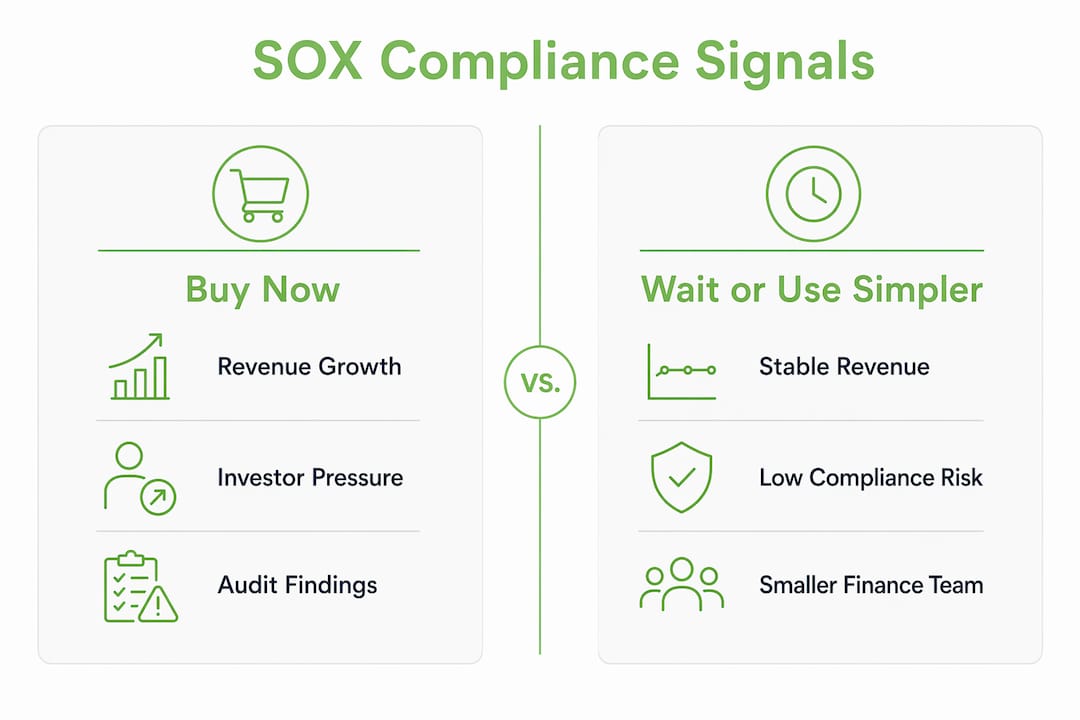
If multiple “buy now” signals apply to your business, a SOX compliance management platform can yield benefits in audit time savings and investor credibility. If you are checking one box, start with documented manual controls and revisit in 12 months.
What should you look for in SOX compliance software?
Core feature checklist
Before you book a single demo, know what you actually need. For SMBs, these features matter most:
- Automated control testing: Full-population analysis beats sample testing. Full-population analytics on financial data catch anomalies that samples miss.
- Audit trail and evidence management: Time-stamped logs and auditor-ready evidence exports cut back-and-forth with your external auditors.
- Continuous monitoring: Real-time alerts on control failures, not quarterly snapshots.
- ITGC coverage: ITGC failures drive most SOX audit issues; prioritize platforms that automate access governance and privileged-activity monitoring.
- ERP and accounting integrations: Native connectors to QuickBooks, NetSuite, SAP, Oracle, or Workday matter more than feature count.
- Role-based workflows: Segregation of duties, review and approval chains, and remediation tracking built in.
Questions to ask vendors in demos
- How does your platform ingest data from our ERP? API, flat file, or native connector?
- Do you offer out-of-the-box control tests, or does every test require custom configuration?
- Can you run full-population analysis, or is testing sample-based only?
- What does an auditor-ready evidence package look like? Can we export it directly?
- What security certifications do you hold (SOC 2 Type II, encryption at rest and in transit)?
- What is your SLA for support, and do you have a dedicated SMB onboarding team?
- What does implementation actually cost, including connectors and professional services?
Red flags to watch
- Hidden implementation fees that double the quoted license price
- Sample-only testing with no path to full-population coverage
- No SOC 2 attestation or published security documentation
- Rigid integrations that require expensive middleware for standard ERPs
- Weak remediation tracking: if deficiencies disappear into email threads, that is a problem
- Poor onboarding resources for small teams with no dedicated compliance staff
Pricing and timeline expectations
Most SMB rollouts run in three phases: scoping and pilot in the first few weeks, integration and testing over the following weeks, and rollout with audit readiness thereafter. Total cost of ownership includes licensing, setup fees, connector costs, and any professional services for custom workflows. Ask every vendor to quote all four components upfront.
How Swipecredit fits your SOX and ICFR needs
Swipe Credit AI helps teams turn permissioned business data into clearer opportunities and measurable economic outcomes while keeping people in control. Access and available capabilities depend on the selected plan and connected systems.
The platform’s AI agents handle data ingestion from existing business systems, map controls automatically, and flag anomalies before they become audit findings. That means your controller spends time on remediation decisions, not on pulling evidence manually. The decision intelligence layer surfaces control status and risk exposure directly to executives, so leadership always knows where the program stands without waiting for a quarterly report.

On security, Swipecredit operates with encryption at rest and in transit, role-based access controls, and governance-first AI design. Those are the same trust signals auditors look for when evaluating your control environment. For real-world proof, the Swipecredit case studies page shows quantitative results across SMB and enterprise deployments.
The practical procurement move: start with a pilot on your highest-risk process (usually revenue recognition or access governance), measure time saved in the first 90 days, then expand. Treat the ERP integration you build in the pilot as a reusable asset for other business functions, not a one-time compliance expense.
Pro Tip: Position the pilot to your CFO as a dual-use investment: the same data pipelines that feed SOX controls also power cash-flow forecasting and executive reporting. That framing gets budget approved faster.
Ready to see Swipecredit in action?
Swipe Credit AI helps teams turn permissioned business data into clearer opportunities and measurable economic outcomes while keeping people in control. Access and available capabilities depend on the selected plan and connected systems.
Request a demo at swipecredit.com and see how the platform handles your specific control environment. Every pilot includes onboarding support and security documentation your auditors can review on day one.
Deployment roadmap: week 0 to week 24
| Phase | Weeks | Key deliverables | Owner |
|---|---|---|---|
| Scoping and pilot | 0–4 | Control inventory, ERP data mapping, pilot test activation | CFO + IT lead |
| Integration and testing | 5–12 | Full ERP connector, automated test library, ITGC coverage | Finance + IT |
| Rollout and remediation | 13–20 | Remediation workflows, role-based access, deficiency tracking | Compliance lead |
| Audit readiness and handover | 21–24 | Evidence packages, auditor exports, executive dashboard | CFO + auditors |
Phase-by-phase checklist
- Weeks 0–4: Document your control universe. Map data sources to controls. Activate the pilot on your top three highest-risk processes.
- Weeks 5–12: Connect your ERP and any secondary data sources. Run automated control tests across the full population. Validate ITGC coverage for access governance and change management.
- Weeks 13–20: Turn on remediation workflows. Assign control owners. Track deficiencies to closure with time-stamped evidence.
- Weeks 21–24: Generate auditor-ready evidence packages. Walk your external auditors through the platform. Lock down the executive dashboard for ongoing monitoring.
Pro Tip: Prioritize ITGCs in weeks 5–12. ITGC automation for access governance and privileged-account monitoring addresses the most common SOX audit failure points and gives auditors confidence early in the cycle.
Engage your external auditors at week four, not week twenty. Showing them the platform before fieldwork begins reduces surprises and often shortens the audit cycle. Also, treat every integration you build as a reusable asset: the same QuickBooks or NetSuite connector that feeds SOX controls can later power AI-driven business reporting and cash-flow analytics.
Key Takeaways
AI-driven SOX compliance software gives SMBs a single source of truth for controls, evidence, and risk, replacing manual spreadsheets with continuous monitoring that keeps leadership informed and auditors satisfied.
| Point | Details |
|---|---|
| AI beats spreadsheets | Automation reduces manual testing time and catches anomalies that sample-based reviews miss. |
| ITGCs come first | Prioritize access governance and privileged-activity monitoring — these drive most SOX audit failures. |
| Pilot before you commit | Start with your highest-risk process; measure time saved in 90 days before expanding. |
| Security signals matter | Confirm SOC 2 Type II attestation, encryption, and role-based access before signing any contract. |
| Request a demo | Book a Swipecredit pilot to validate fit before a full rollout commitment. |
SOX compliance is business intelligence, not just a checkbox
Most founders treat SOX as a tax: something you pay to stay out of trouble. That framing is expensive. The controls data you build for Section 404 compliance is also your most accurate picture of how money moves through your business. Access logs, transaction trails, and reconciliation evidence tell you where your processes break down, where fraud risk lives, and where cash is leaking.
The businesses that get the most from compliance automation are the ones that connect it to executive decision-making. When your CFO can see control status, open deficiencies, and remediation progress on the same dashboard used for revenue forecasting, compliance stops being a sidebar and starts informing strategy. That is the role of AI in business risk management: not replacing your judgment, but surfacing the right information before a problem becomes a restatement. Humans still own remediation decisions and auditor sign-off. AI handles the data work that used to eat weeks.
Start your SOX automation pilot with Swipecredit
Swipecredit’s implementation team works with SMBs from scoping through audit handover. Whether you need a focused pilot on revenue controls or a full ICFR automation rollout, the platform adapts to your existing systems and your team’s capacity.
Three ways to get started: request a demo, start a pilot on a single high-risk process, or speak with an implementation specialist about a phased enterprise engagement. Every engagement includes security documentation, onboarding support, and a clear timeline so your auditors know what to expect.
Book your demo at swipecredit.com and protect the audit cycle that protects your business.
Useful sources
- Vensa: Research on how SOX automation reduces manual testing time for finance and audit teams; useful for quantifying the business case.
- Process Street — SOX compliance software: Practical overview of continuous monitoring and how AI shifts programs from reactive to proactive.
- Pathlock — SOX compliance software: Deep coverage of ITGC automation, access governance, and privileged-activity monitoring.
- Supervizor — SOX automation software: Explains full-population testing and auditor-ready evidence exports.
- Workiva — SOX compliance software: Industry perspective on connected risk platforms and single-source-of-truth architecture.
- Swipecredit case studies: Quantitative results from real SMB and enterprise deployments; primary E-E-A-T proof point.
- Swipecredit services: Implementation and onboarding support detail for SMBs evaluating timelines and professional services costs.
FAQ
What does SOX compliance software actually cost for an SMB?
Pricing varies by vendor and scope, but total cost of ownership for an SMB typically includes a licensing fee, setup or onboarding costs, ERP connector fees, and optional professional services. Always ask vendors to quote all four components before comparing options.
Will auditors accept evidence generated by automated SOX tools?
Yes, provided the platform maintains time-stamped audit trails and role-based access logs. Auditor-ready evidence exports with full documentation chains are a standard feature of reputable SOX automation platforms.
Which ERP integrations should I prioritize?
Start with whatever system holds your general ledger: QuickBooks, NetSuite, SAP, or Oracle are the most common SMB starting points. Native connectors beat middleware for reliability and audit defensibility.
How long does a typical SMB SOX automation rollout take?
A phased rollout runs roughly 24 weeks: scoping and pilot in weeks 0–4, integration and testing through week 12, rollout and remediation through week 20, and audit readiness by week 24.
Is AI-driven SOX compliance secure enough for financial data?
Swipe Credit AI helps teams turn permissioned business data into clearer opportunities and measurable economic outcomes while keeping people in control. Access and available capabilities depend on the selected plan and connected systems.